Unity environment guide
Build a tavern that feels lived in, not just filled with props
Start with the room's job, build a strong bar and circulation path, then use furniture, light, and small clutter to make the space believable.
The fastest way to make a tavern look convincing is to stop thinking about individual props first.
Decide what the player should understand the moment they enter: where the bar is, where people gather, where they can move, and which part of the room matters most.
Once that reads, the smaller objects have a job. Bottles make the backbar feel stocked. Mugs make tables feel used. Barrels belong near service. A bed, divider, and wall light can turn the same interior into an inn instead of just another drinking room.
Start with the anchor
Make the bar the room's visual center
A good bar solves several problems at once. It gives the room a landmark, organizes the service side of the scene, and gives smaller bottles, mugs, and lights a strong surface to read against.
Block the counter before you decorate it. Check the player view, not just the Scene window. If the bar disappears behind tables or sits too far from the natural path through the room, no amount of clutter will fix the hierarchy.
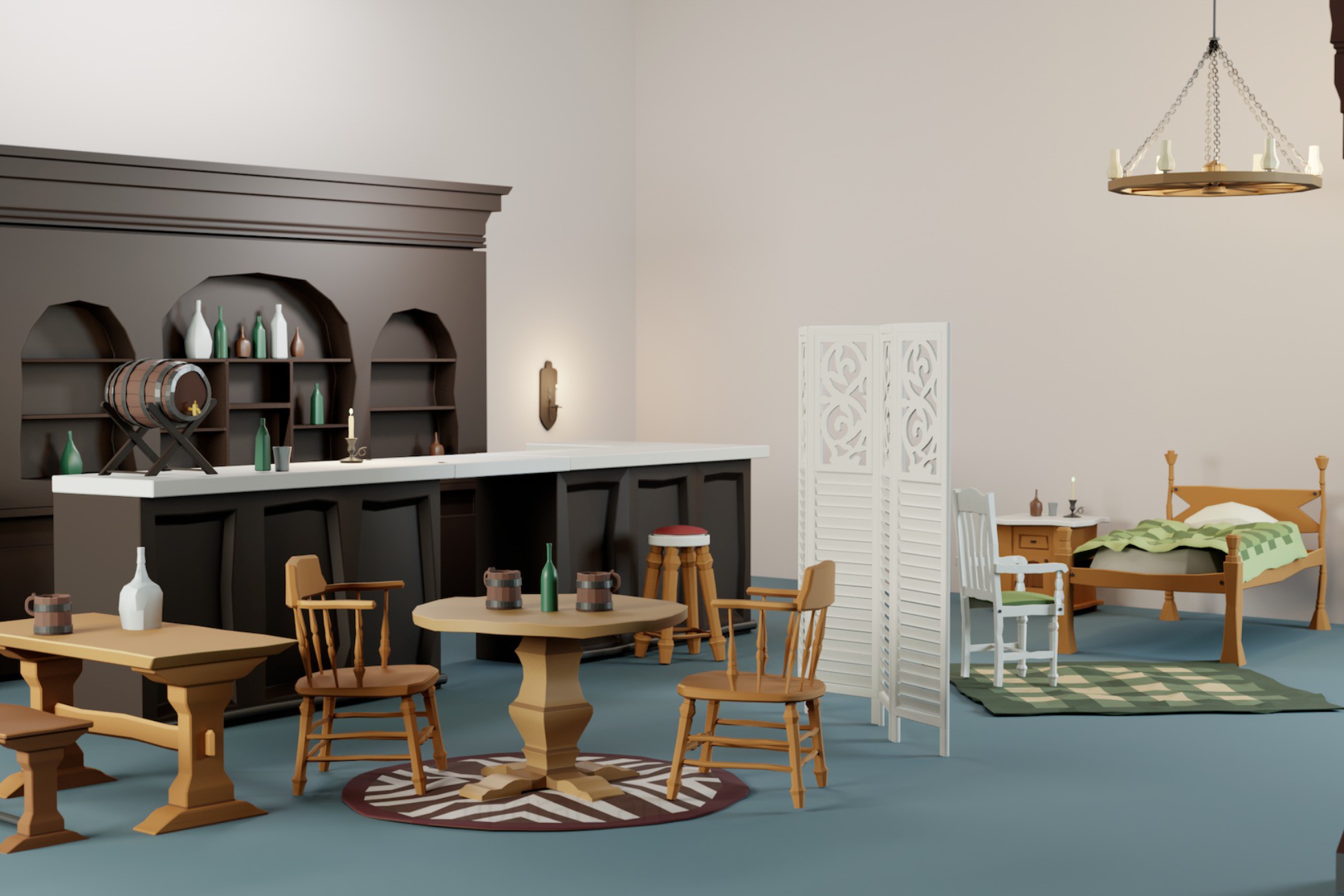
Actual image from the Tavern Props Pack Asset Store gallery.
Scene-building order
Build the room in layers
Get the composition working first. Detail pays off only after the room reads.
Block the room
Set the entrance, bar, seating zones, and a clear path before you dress anything.
Place the big shapes
Bar, tables, bed, divider, and major lights establish the silhouette and rhythm.
Add use
Mugs, bottles, barrels, stools, and small clusters make each zone explain what happens there.
Remove the excess
Leave quiet surfaces. If every table and shelf is full, nothing feels intentional.
Furniture is composition
Build small social pockets instead of a grid of tables
Repeated furniture is useful; repeated placement is what makes a scene feel copied and pasted. Turn chairs, offset benches, leave a seat pulled away, and give one table more breathing room than another.
For gameplay, keep the circulation path obvious. In first person or VR, test it at player height early. A layout that looks clean from above can feel cramped once you are standing inside it.
Use furniture placement to create separate pockets without changing the art style.
Clutter should explain the room
Dress by function, not by empty surface
A mug on a table says somebody sat there. Bottles behind the bar say inventory. A barrel beside the service area belongs there for a reason. That is more convincing than putting one decorative object on every open surface.
Use density selectively: a busy bar, a half-used table, a quieter corner. The contrast makes the room feel inhabited instead of procedurally scattered.
Small props work best when they reinforce a use: drinking, serving, storage, or sleeping.
“Lived in” usually comes from relationships between objects, not from owning more objects.
Place props in little stories, not as decoration quotas.One pack, two moods
Let the inn area breathe
If the same interior includes sleeping space, change the rhythm. The inn side should usually be quieter than the bar: larger calm surfaces, fewer repeated drink props, warmer local lighting, and a little more separation.
The pack includes a bed and bedding, nightstand, divider screen, rugs, a door, chandelier, and wall sconce. A divider is especially useful because it creates depth and privacy without forcing you to build another full room.
The same style can support a busier public tavern and a quieter private inn area.
Skip the prop-modeling stage
Stylized Tavern Props Pack
If your scene already needs this vocabulary, including bar pieces, tables, seating, drink clutter, lighting, and an inn setup, the pack is simply a faster way to get to the scene-building part.
- Modular bar counter pieces and backbar shelving
- Round and trestle tables, bench, chairs, and stool
- Bottle variants, mugs/cups, barrels/kegs, and candles
- Bed and bedding, nightstand, divider screen, rugs, and door
- Chandelier and wall sconce lighting props
Keep the art readable
Use detail where the player will actually notice it
Stylized interiors usually benefit more from a clear silhouette than from tiny surface noise. Put the strongest shapes near the player’s path and reserve the smallest clutter for places the camera can actually see.
That also helps performance and iteration: you spend time on what changes the read of the scene instead of dressing hidden corners nobody visits.
The pack uses chunky silhouettes and a compact material workflow so the scene still reads at gameplay distance.
In-engine look
See the Tavern Props Pack in motion
Quick fit check
Know what you're buying
Good fit if you need
- RPG hub interiors
- Taverns and inns
- Cozy medieval/fantasy interiors
- Narrative scenes
- Fast prototyping and set dressing
Bring your own
- A complete modular building shell or exterior architecture kit
- HDRP projects without doing your own material conversion
- Projects that need characters, animation, or gameplay systems bundled in
Technical snapshot
Enough detail to check fit quickly
- Props
- 30+
- Prefabs
- 40
- LOD groups
- Yes
- Materials
- 3
- Texture workflow
- Color, roughness, and metallic/smoothness atlases
- Tested Unity
- Unity 6.3 LTS
- Pipeline
- URP; Built-in listed compatible for the current Unity 6 versions
- Download
- 5.6 MB
Actual Asset Store gallery
Inspect the actual pack before you buy
Open any image for a larger view and check whether the style, scale, and prop density fit your project.
Quick answers
What it is and what it isn’t
Does it include the whole tavern building?
No. It is an interior prop and set-dressing pack. Bring your own walls, floors, roof, or environment shell.
Is it only for VR?
No. The prop pack is for ordinary Unity scenes too: RPG hubs, inns, narrative interiors, prototypes, and cozy fantasy environments. The separate XR Tavern Starter Kit is the VR systems product.
Does it include tavern gameplay?
No. This pack is art. For pouring, orders, serving validation, scoring, and the dart mini-game, use the separate XR Tavern Interaction Starter Kit.
What render pipeline is it for?
URP is the primary setup. Built-in is also supported for the listed Unity 6 versions. HDRP is not supported.
Ready to build the room?
Start with the Tavern Props Pack
Use it when you want to spend your time arranging the scene instead of modeling the same furniture and clutter from scratch.